Showing posts with label News. Show all posts

October 5, 2013

Finally, BlackBerry Messenger is coming to Android and iPhone.


     The BBM app will be available for devices running Android
 4.0 and up, or iOS 6 and iOS 7. It will allow Android and
 iOS users to communicate with BlackBerry owners.
 BlackBerry's popular BlackBerry Messenger (BBM) instant
 chat application will be available for Google's Android and
 Apple's iPhone the company said.
 Rumors about the app coming to Android and iPhone
 started in June. The app will be available for devices
 running Android 4.0 and up, or iOS 6 and iOS 7. It will
 allow Android and iOS users to communicate with
 BlackBerry owners.
 BlackBerry Messenger (BBM) is a proprietary Internet-
 based instant messenger and videotelephony application
 included on BlackBerry devices that allows messaging
 (and videocalls for BlackBerry 10 smartphones) between
 BlackBerry users. BBM currently has more than 60 million
 monthly active customers on BlackBerry alone, and the
 overwhelming majority use BBM an average of 90 minutes
 per day.
 The news comes in the wake of other rumors that
 Blackberry could fire 40% of its staff. This comes at a
 time that the company is suffering heavy losses from its
 failed PlayBook tablet and a fading popularity in the
 smartphone market.
 BBM for Android and iPhone
 features:
 BBM Chat – Enjoy real, immediate conversations with
 friends on Android, iPhone and BlackBerry smartphones.
 Not only does BBM let you know that your message has
 been delivered and read, it also shows you that your
 friend is responding to the message.
 More than chat – With BBM you can share files on your
 phone such as photos and voice notes, all in an instant.
 Keep your group in the loop – Multi-person chats are a
 great way to invite contacts to chat together.
 BBM
 Groups lets you invite up to 30 friends to chat together,
 and go a step further than multi-chat by sharing photos
 and schedules. And, with Broadcast Message, you can
 send a message out to all your BBM contacts at once.
 Post Updates and stay in the know – BBM lets you post a
 personal message, profile picture and your current status,
 and lets your contacts know instantly in Updates.
 Your unique PIN – Every BBM user has a unique PIN that
 maintains your privacy, so you don’t have to give out
 your phone number or email address to a new or casual
 contact.
 Availability: BBM will be available as a free download for
 Android smartphones running Ice Cream Sandwich and
 Jelly Bean (Android 4.x) beginning at 7AM EDT on
 September 21.
 BBM for iPhones running iOS 6 and iOS 7
 will become available for each market on the App Store
 schedule of 12:01 AM local time on September 22.
 You can download the app from the BBM website.

May 24, 2013

Android v5-LimePie­


Android Lime pie is the most eagerly awaited version in the android OS. Ever since the launch of version 4-the jellybean, it was rumoured that a more powerful and advancad version is on its way. However the exact launch date of this Lime Pie is not yet officially declared.

Expected Features of Lime Pie­

*. Some sources said in February that Google is now working on Linux 3.8 Kernel, which was expected to be for Lime Pie. If they were doing so, Android Lime Pie would be gifted with lower RAM usage and hence good speed and multi-tasking.

*. Babble, the cross platform messaging by Google, now known as Google Hangoutswill be a part of Lime Pie

*. Android Police found one Google Glass App , MyGlass, which could integrate Google Glass with Android Smartphone.

*. On top of all, a huge change is expected in Android’s User Interface asit may move from a brighter one like Gingerbread. The brighter UI was replaced by a dark one first in Ice Cream Sandwich.

April 16, 2013

Upcoming Intel Core i9 Processor


It will be 10% faster than the latest six-core i7 3930 processor It can be placed in a LGA 1366 socket and

will be supported by the X58 Express chipsets which support the current Core i7. They will also include

built-in graphics similar to all codename: "Gulftown" processors.

April 9, 2013

HTC One launched in India for Rs. 42,900, available April end


HTC has launched the HTC One, the company’s latest flagship Android smartphone in India. It was announced back in February and packs a 4.7 inch (1920 x 1080 pixels) Full HD display, powered by a 1.7 GHz quad-core Qualcomm Snapdragon 600 processor and runs on Android 4.1 (Jelly Bean) with the new HTC Sense UI and HTC BlinkFeed. It has an UltraPixel camera on the back with LED Flash and a 2.1MP HD front-facing camera with 88 wide angle lens with HDR capability. It has a Metal Unibody Design, comes with Beats audio support, HTC Sense TV app with program guide and remote control, Dual frontal stereo speakers with built-in amplifiers and dual microphones.


HTC One Specifications

4.7-inch (1920 x 1080 pixels) Full HD display with 468ppi
1.7 GHz quad-core Qualcomm Snapdragon 600 processor
Android 4.1 Jellybean with HTC BlinkFeed
HTC Zoe, HTC BoomSound
UltraPixel rear camera with LED Flash, BSI Sensor and Optical Image Stabilization ,F2.0 aperture and 28 mm lens
Full HD (1080p) video recording with HDR Video
2 MP HD front-facing camera
3.5 mm headset jack, Beats audio support
2 GB RAM, 32GB internal memory
3G HSPA+, WiFi 802.11 a/ac/b/g/n, Bluetooth 4.0 with aptX codec, DNLA, MHL, GPS with GLONASS, NFC
2300 mAh battery
The HTC One is priced at a MOP (Best Buy) of Rs 42,900. It would be available by the end of April 2013. It comes with 1GB of free 3G data for 3 months for Reliance GSM customers along with free WhatsApp and Facebook for 3 months

April 8, 2013

Facebook Home hands on impressions


          Facebook Home, the launcher aimed at overtaking your Android phone has just leaked out in a half baked beta release. We took it for a spin on our Google Nexus 4, and found it to be quite buggy, but using the UI for the first time was a fresh experience. So, what do we think about the Facebook home? Will it change your mind about Facebook on mobile? Should you go for Facebook home, if you are a heavy user? We will try to answer them in our initial hands on impressions, past the video below -


We were required to install three APKs to make the Facebook home work. Once installed, you need to select Facebook home as the default launcher.


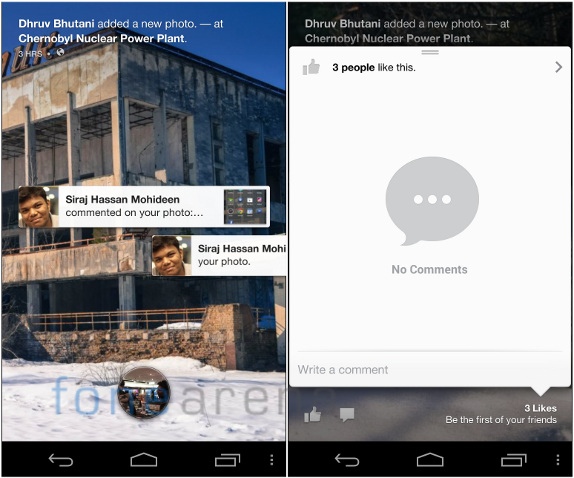
The first screen on the left is the one you get once you unlock the device. The background is a slide show of your news feed with pictures animating slowly with the Ken Burns effect. On the top you can see the information about the photo. The round button at the bottom is the profile bubble, which, on activation reveals three quick shortcuts. On the left is the camera, which currently doesn’t work, while on the right is the most recently opened app, and on the top is the shortcut for the app drawer shown on the right.

The app drawer has all the pinned apps, which are selected from the app list when you swipe to the right. Above the pinned apps, there are three facebook shortcuts for posting a status, a photo and a check in. While these are not working in the current build, it is expected that they will get the respected functionality done.


If you have received any notifications, they will appear on the lock screen and you can swipe them away or tap to open them. If there are a bunch of notifications, you can grab them and throw them with a swipe down gesture. Coming back to the cover feed, you can quickly preview the likes and comment on the photo by touching the bottom right part of a cover feed picture. Shown on the right side picture above.


Since this is a beta app, there are two Facebook home settings, one is full of developer related tweaks and filters, while the other is more facebook management oriented, with full of filters and notifications tweaking. The one above is labeled “Facebook home settings”, and the one below is labeled just “settings” when you press the overflow menu.


For now, only a few functions work as we said earlier. We couldn’t get the camera or the chat heads working for example. Clearly is a beta app, and we hope to get the real deal on the 12th, which is just 4 days away.

So, coming to our impressions. Basically the cover feed is a slide show of your news feed in full lock screen style pictures and a nice animation. Do we like it? Yes. It is beautiful and makes browsing the news feed easy and liking, commenting from outside the app is much welcome. The app list with pinned items too makes sense, but we definitely miss our widgets. Once enabled, the Facebook shortcuts on the app list will make sense, but currently we can’t do anything about it. Overall, we find the aesthetics pleasing to the eye and the animations really snappy, which, for a beta app, is a great achievement.

If you are totally into Facebook and it is really an important part of your life, then we think Facebook home is the right fit for you. However, we are slightly concerned with privacy, because the lock screen is going to show everything. If that’s totally not a problem then, Facebook home should be really enjoyable.

Also, this changes the game considerably in the social networking space. Facebook have managed to create something so integrated and far from the default experience, making any Android phone look like a Facebook phone. With Facebook being the numero uno app in all the smartphone app stores, it’s not really hard to guess if Home will be widely accepted or not. Starting 12th, we will be seeing it roll out to a few devices and then more, with monthly updates planned for adding more functionality. Exciting times ahead.

Have any questions about Facebook Home on the Nexus 4? Let us know in the comments section below.

Source:-fonearena.com

April 3, 2013

Google Inc will launch a new version of its Nexus 7 tablet powered by Qualcomm Inc's Snapdragon processor around July


Google plans to release a new version of the Nexus 7 tablet powered by a Qualcomm Snapdragon processor, reports Reuters. The upcoming Google Nexus tablet would have a high-resolution display, thinner bezel and have a Snapdragon Chip, instead of a quad-core Nvidia Tegra 3 processor says Reuter’s sources. No details about the model number of the Qualcomm chip or the display size yet.

Google unveiled the Nexus 7 last June, and the 3G version with 32GB storage was announced at the Google I/O in October last year. Google Nexus 7 16GB WiFi version went on sale in India from the Google Play Store few weeks back at a price tag of Rs. 15,999. Asus launched the 32GB WiFi and 32GB 3G versions of the tablet in India yesterday for Rs. 18,999 and Rs. 21,999, respectively.

No details about the pricing yet, but it is expected at a starting price of $199 similar to the Nexus 7 tablet, or lesser than that to compete with the other low-cost Android tablets. Google plans to ship 8 million units of Nexus 7 tablets in the second half of this year.

Source: reuters

FEATURES :


Display

It has a 7-inch Back-lit IPS HD display with a resolution of 1280×800 pixels at 216 ppi. The screen is covered with a scratch-resistant corning glass.

Camera

The device comes with a 1.2 megapixels front camera.

Memory

It comes with 1GB of RAM and 16GB/32GB of internal memory.

Processor

This device is powered by Nvidia Tegra 3 quad-core processor.

Operating System

It runs Android 4.1 (Jelly Bean).

Connectivity Options

Its connectivity options include WiFi 802.11 b/g/n, Bluetooth and NFC (Android Beam). The 3G version offers data connectivity through a SIM card slot, but you can’t make calls or send an SMS

Battery

The Google Nexus 7 is powered by a 4325 mAH battery which is claimed to give up to 8 hours of active use


April 1, 2013

WhatsApp, Skype, Viber breaking rules: Saudi Arabia


        Saudi Arabia warned today of "suitable measures" if providers of internet messenger applications such as WhatsApp fail to comply with its rules, days after the industry said authorities wanted to control such traffic.

"Some telecom applications over the internet protocol currently do not meet the regulatory conditions" in the kingdom, said the Communications and Information Technology Commission in a statement carried by the official SPA state news agency.

These applications include WhatsApp, Skype and Viber, and allow text and audio communication over the Internet.

The commission has told service providers in Saudi Arabia to work with the developers of such applications to "quickly meet the regulatory conditions," but it did not specify how they violate the rules in the ultra-conservative country.

"The commission will take suitable measures regarding these applications and services if those conditions are not met," it said, in a veiled threat to ban the programmes.

Industry sources said this week that the authorities had asked telecom operators to furnish a means of control that would allow censorship in the absolute monarchy. One source said the providers had been given a week to comply.

An industry source said telecom operators were behind the move, accusing the Saudi Telecommunications Co. (STC), along with Mobily and Zain, of asking the commission to impose censorship because of the "damage" caused by free applications.

In the neighbouring United Arab Emirates, most Skype applications and Viber calls are blocked, but WhatsApp messenger remains accessible.

The two Gulf neighbours in 2010 threatened to ban BlackBerry instant messaging and demanded that the company install local servers to censor the service.

Instant messaging services on BlackBerry remain uninterrupted, but it is not clear how far the Canadian smartphone manufacturer went to comply. (AFP) ASY

source:- Timesofindia